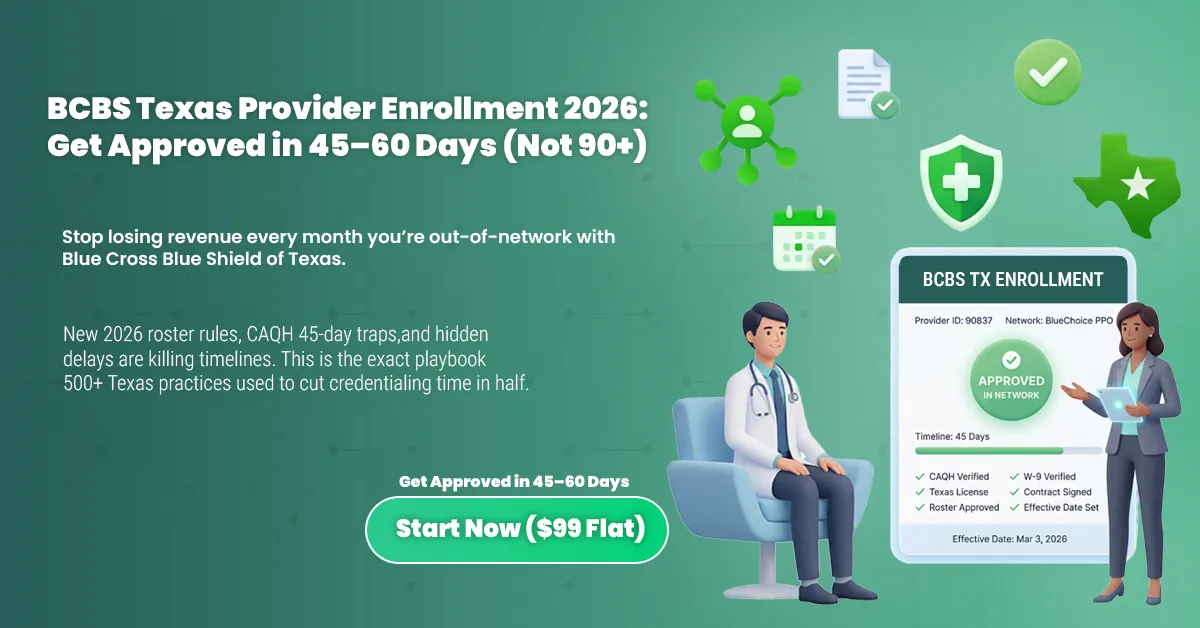




Waiting three months for BCBS TX provider enrollment while every Blue Cross patient gets billed out-of-network? That's revenue you're never getting back. If you've dealt with BCBSTX credentialing before, you already know how quickly things can stall.
Blue Cross Blue Shield of Texas's approval timeline disrupts practices throughout the state. Confusing requirements, rejected applications, and the new 2026 roster template rules catch most providers off guard. By the time they realize something's wrong, weeks have already slipped by.
This guide breaks down exactly what BCBSTX expects in 2026. You'll see the full process, the mistakes that cause delays, and how to cut your credentialing time in half.
At MedSole RCM, we've handled BCBS Texas provider enrollment for over 500 practices. We know what gets applications approved and what causes them to stall.
BCBS TX provider enrollment is the process by which healthcare providers apply to join Blue Cross Blue Shield of Texas networks, enabling them to bill BCBSTX as in-network providers and receive contracted reimbursement rates.
What is BCBS TX Provider Enrollment?
BCBS TX provider enrollment is the formal process through which healthcare providers apply to join Blue Cross Blue Shield of Texas networks. This applies to physicians, nurse practitioners, therapists, and ancillary providers alike.
Completing BCBSTX provider enrollment means you can bill as in-network. You'll receive contracted reimbursement rates and serve patients covered by commercial, Medicare Advantage, and Medicaid managed care plans. Without it, every BCBS claim processes out-of-network.
Most practices treat payer enrollment and credentialing as the same thing. They're not. Insurance paneling involves multiple distinct steps, and mixing them up creates billing problems you won't catch until claims start getting paid wrong.
The Difference Between Enrollment, Credentialing, and Contracting
The contracting process with BCBSTX has three stages. Each one must finish before you're truly in-network.
|
Term |
What It Means |
BCBSTX Context |
|
Enrollment |
Submitting the provider’s initial application |
Provider Onboarding Form |
|
Credentialing |
Verifying the provider’s qualifications |
CAQH + Primary Source Verification |
|
Contracting |
Signing the payer network agreement |
Fee schedule approval + effective date setup |
Here's where it gets confusing. You can receive a Provider Record ID from BCBSTX and assume you're in-network. You're not. That ID is just for tracking purposes inside their system.
A Provider Record ID does NOT automatically enroll you in-network. Claims are processed out-of-network until you're contracted, approved, and activated with an effective date.
Only after all three steps finish does BCBS Texas network participation begin. Until then, you'll see reduced payments and patient balance issues on every Blue Cross claim.
Not sure where you stand in the enrollment process? Get a free enrollment assessment from MedSole RCM →]
BCBS TX Provider Enrollment Requirements 2026: Complete Guide by Provider Type
BCBSTX updated its enrollment requirements for 2026, and several changes are already causing delays for practices that haven't kept up. Below is the complete, current list of what you need for BCBS TX provider enrollment, organized by provider type, plus the critical deadlines you cannot miss.
Note: For Texas Medicaid managed care enrollment (STAR, CHIP, STAR Kids), see Section 8 below. It requires a different pathway through TMHP/PEMS.
Critical 2026 Update: New Roster Template Rules
This one catches group practices off guard constantly. BCBSTX now enforces strict version requirements on the roster templates used for BCBS TX group practice enrollment.
2026 ALERT: BCBSTX Roster Template Enforcement
Effective Feb. 1, 2026: BCBSTX will NOT accept group rosters on templates older than version 25.11.22
Effective Sept. 1, 2025: Templates older than 25.06.23 already being rejected
If you're using an old roster template, your application will be returned, adding 2 to 4 weeks to your timeline.
Download a fresh template directly from the BCBSTX provider portal before every submission. Don't assume last year's version still works.
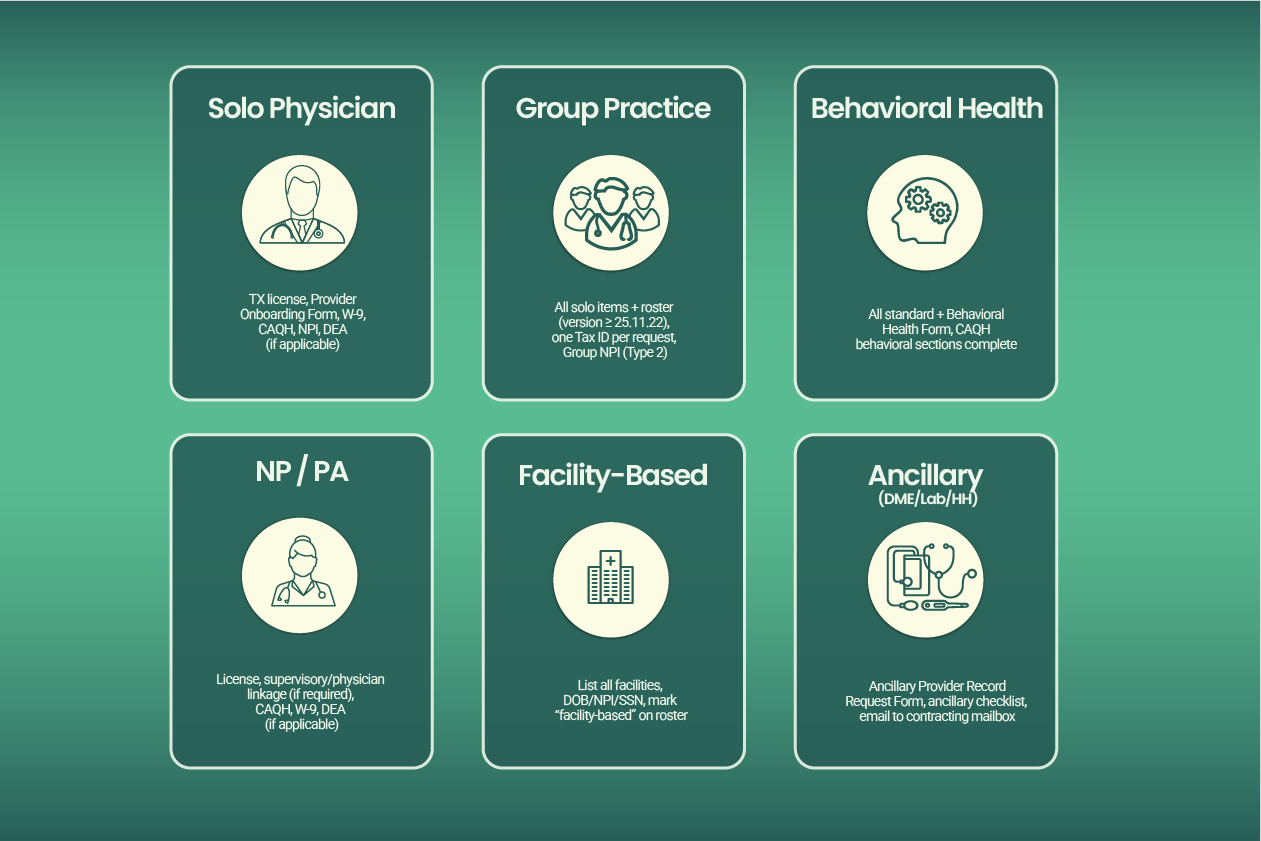
Solo Physician / Professional Provider Requirements
BCBS TX solo practitioner enrollment follows a standard path, but the required documents list is specific. Miss one item and your BCBSTX provider enrollment application sits in a queue until someone notices.
What you need for BCBS TX physician enrollment:
✓ Valid Texas license in good standing (verify with Texas Medical Board)
✓ Physical practice address in Texas or a contiguous county
✓ Completed Provider Onboarding Form (solo version)
✓ Signed and dated W-9 form
✓ Copy of your state license
✓ Medical school and residency information (required for MD/DO)
✓ Active CAQH ProView profile
✓ NPI number (Type 1, Individual)
✓ DEA registration (if applicable to your specialty)
✓ Malpractice insurance certificate
Timeline: Standard BCBSTX credentialing through CAQH runs 60 to 90 days. Board certification may be required for specialists. Solo enrollment often processes faster than group because there's no roster to verify.
Group Practice Requirements (Where Most Delays Happen)
Healthcare credentialing Texas practices find most frustrating? Group enrollment. The roster verification step alone can add weeks if anything is off.
Everything from the solo checklist PLUS:
✓ Provider Onboarding Form (group version)
✓ Completed provider roster using template version 25.11.22 or newer
✓ One Tax ID per onboarding request (this is critical)
✓ Group NPI (Type 2) linked correctly to individual providers
✓ All individual providers must also complete credentialing separately
Here's the mistake we see constantly: practices submit one BCBSTX provider onboarding form with multiple Tax IDs listed. BCBSTX requires one Tax ID per request. Submitting multiple Tax IDs in a single request is one of the top reasons for processing delays.
Timeline: Group enrollment takes longer than solo due to roster verification. Plan for the full 90 days, sometimes more if corrections are needed.
Mental and behavioral health providers
BCBS TX mental health provider enrollment requires an extra form that many providers don't know about until their application stalls.
Standard requirements PLUS:
✓ Behavioral Health Form (REQUIRED, in addition to all standard forms)
✓ Active CAQH ProView profile with behavioral health sections complete
✓ Consider applying to both commercial and Medicaid panels simultaneously
BCBSTX notes that failure to attach required forms, like the Behavioral Health Form, can delay or reject network loading entirely. We've seen BCBS TX behavioral health credentialing applications sit for weeks because this single form was missing from the packet.
If you're a therapist, psychologist, or psychiatrist, confirm you have this form before hitting submit.
Nurse Practitioners & Physician Assistants
BCBS TX nurse practitioner credentialing follows the standard professional provider track, but Texas supervisory rules add a layer of complexity.
Requirements:
✓ Verify collaborative or supervisory requirements per current Texas law
✓ Link to supervising physician if required (check current TX regulations)
✓ Own NPI number (Type 1) required
✓ All standard documentation: state license, DEA, malpractice insurance, W-9
✓ Active CAQH ProView profile
Texas has updated its NP practice authority rules in recent years. Before submitting, confirm whether your arrangement requires physician linkage in the BCBSTX system. Getting this wrong means rework later.
Hospital/Facility-Based Provider Requirements
Facility-based providers have a specific requirement that trips up applications: you must list every facility where you practice.
For Individual Facility-Based Providers:
✓ List the name of EACH facility you service in the comments section of the Provider Onboarding Form
✓ Don't abbreviate or assume BCBSTX knows your affiliations
✓ Include all data points: your DOB, NPI, SSN, gender, Tax ID
For Group Facility-Based Providers:
✓ Mark "facility-based" on the roster
✓ Enter facility information in the specified roster column
✓ Complete every field accurately
BCBSTX warns that incomplete data prevents network loading. If you work at three hospitals, list all three. Miss one, and your application comes back.
Ancillary Providers (DME, Home Health, Labs, SNF, ASC)
BCBS TX ancillary provider enrollment follows a completely different track than professional provider credentialing. Don't use the standard onboarding form.
The ancillary enrollment process:
-
Complete the Ancillary Provider Record Request Form
-
Email the form with supporting documents to the address listed on the form
-
Wait for your Provider Record ID to be established
-
Complete the Credentialing/Recredentialing questionnaire
-
Complete the ancillary checklist for your provider type
-
Contact the ancillary contracting mailbox to initiate contracting
Timeline: Ancillary credentialing can take up to 90 days per BCBSTX guidelines. Incomplete or duplicate applications extend this further. We've seen DME suppliers wait four months because they submitted through the wrong channel initially.
CAQH ProView Requirements (The 45-Day Rule)
Most professional providers need CAQH for BCBS Texas enrollment. What many don't realize is there's a hard deadline built into the process.
THE 45-DAY RULE: If you fail to finalize your CAQH application within 45 days, BCBSTX can discontinue your credentialing and require you to restart from scratch.
That's not a soft warning. We've watched practices lose two months of progress because their CAQH profile sat incomplete.
CAQH ProView requirements for BCBSTX:
✓ Profile must be 100% complete and attested
✓ All information must match your BCBSTX application exactly (addresses, phone numbers, everything)
✓ Re-attestation required within 120 days of submission
✓ Authorize BCBSTX to access your CAQH data
If CAQH doesn't apply to your provider type: Use the Texas Standardized Credentialing Application through TDI. Submit supporting documents including state license copies, DEA certificate, malpractice face sheet, CV, and attestation forms.
BCBS TX Provider Enrollment Process: 7-Step Walkthrough for 2026
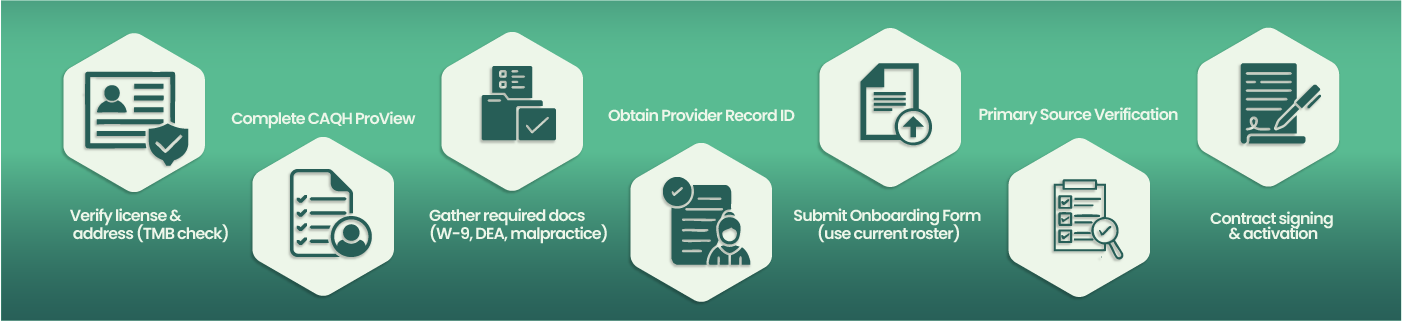
The BCBSTX enrollment process involves seven distinct steps. Missing any step, or completing them out of order, can add weeks to your timeline. Here's exactly what to do to join the BCBS Texas network.
Step 1: Verify Your Texas License & Practice Address
What you do: Check your license status directly on the Texas Medical Board website. Verify everything matches what you'll put on your application.
Where: tmb.state.tx.us for physicians, or your specific board's website
Time required: 15 to 30 minutes
Common mistake: Using an old practice address that doesn't match your current location. BCBSTX flags this immediately.
Pro tip: Print screenshots of your license verification. You'll need them later when BCBSTX asks for clarification on something minor.
Step 2: Complete Your CAQH ProView Profile
What you do: Log into CAQH ProView and fill out every single section. No blanks allowed. Even fields that seem optional aren't really optional for BCBSTX credentialing application purposes.
Where: proview.caqh.org
Time required: 2 to 4 hours if starting fresh, 30 minutes if updating
Common mistake: Leaving the hospital affiliations section blank because you're office-based. BCBSTX wants it completed anyway.
Pro tip: Save after each section. CAQH times out after 20 minutes of inactivity, and you'll lose unsaved work. Set a timer if you need to.
Step 3: Gather Required Documents
What you do: Collect physical or digital copies of everything BCBSTX requires. Create a single folder on your computer with clear file names.
Where: Your filing cabinet, insurance carrier portals, state board websites
Time required: 1 to 2 hours if organized, half a day if not
Common mistake: Using an outdated malpractice certificate. It must show current coverage dates when you submit.
Pro tip: Name your files like this: "2026_W9_PracticeName" and "2026_DEA_DrSmith". When BCBSTX asks for something specific three weeks later, you'll find it instantly.
Step 4: Obtain Your BCBSTX Provider Record ID
What you do: Submit the initial request through the BCBSTX provider onboarding process. This creates your tracking number in their system.
Where: BCBSTX Provider Portal or through Availity
Time required: 5 to 7 business days for ID assignment
Common mistake: Thinking this Provider Record ID means you're in-network. It doesn't. It's just a tracking number.
Pro tip: Write this ID everywhere. You'll need it for every phone call, email, and status check for the next three months.
Step 5: Submit BCBSTX Provider Onboarding Form
What you do: Complete the correct version of the BCBSTX provider onboarding form based on your practice type. Solo providers use the individual form. Groups need the group version plus that roster template we discussed earlier.
Where: Download from BCBSTX provider portal, submit via email or portal upload
Time required: 1 hour for solo, 3 to 4 hours for groups
Common mistake: Groups submitting rosters on template versions older than 25.11.22. Check the version number in the footer before you start entering data.
Pro tip: PDF everything before submitting. BCBSTX sometimes claims they didn't receive attachments sent as separate files.
Step 6: Complete Primary Source Verification
What you do: Wait while BCBSTX verifies your education, licensure, and malpractice history through primary source verification. Respond immediately to any requests for clarification.
Where: They contact you via email or portal message
Time required: 45 to 60 days if everything matches, 60 to 90 days if discrepancies exist
Common mistake: Not checking email daily. BCBSTX gives you 10 business days to respond to requests. Miss it, and you start over.
Pro tip: Add the BCBSTX credentialing email to your safe senders list. Their messages often land in spam folders.
Step 7: Contract Signing & Network Activation
What you do: Review the provider agreement, verify fee schedules, sign, and return. Your effective date for BCBS TX provider enrollment gets assigned after this.
Where: DocuSign or physical mail, depending on BCBSTX preference
Time required: 5 to 10 business days after signing for activation
Common mistake: Not reviewing the fee schedule carefully. Once signed, you're locked in for the contract term.
Pro tip: Ask for your effective date in writing. When claims processing issues come up later, you'll need proof of when your network participation actually started.
The entire onboarding process typically runs 60 to 90 days when everything goes right. Factor in corrections and back-and-forth, and you're looking at three to four months.
How do I enroll as a BCBS Texas provider successfully? Follow these steps exactly. How to become a BCBS Texas provider faster? Don't skip the preparation in Steps 1 through 3.
This Process Sound Overwhelming?
You're not alone. Most providers tell us Steps 4 through 6 are where things stall: waiting for responses, tracking status, and catching errors before they become rejections.
That's exactly what MedSole RCM handles for you. We manage the entire application submission and credentialing approval process from start to finish.
How Long Does BCBS TX Credentialing Take? (Realistic 2026 Timeline)
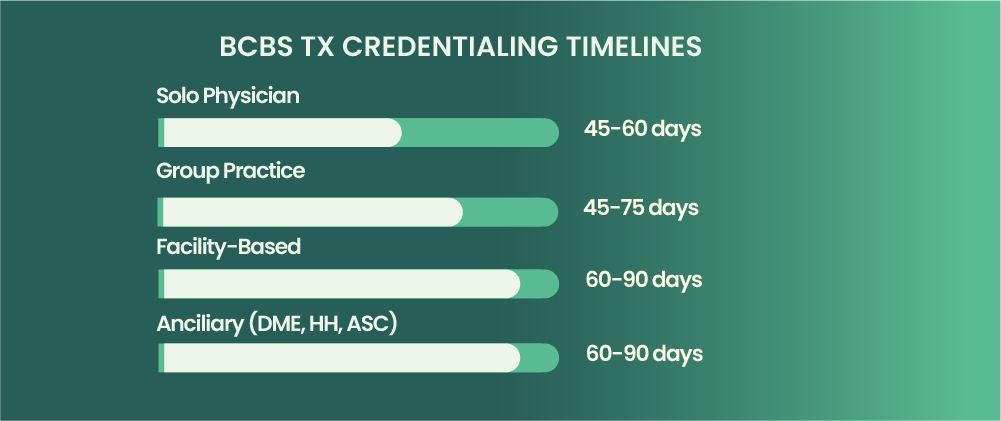
BCBS TX credentialing typically takes 60 to 90 days for office-based physicians and professional providers. Ancillary providers may experience timelines up to 90 days. Applications with errors, missing documents, or CAQH discrepancies can extend this to 120 days or longer.
That's the standard answer. Here's what actually happens in practice.
The approval timeline depends heavily on your provider type and how clean your application is. One missing form can add a month. A CAQH that doesn't match your W-9 can add six weeks. Most practices don't realize how long until they can bill BCBS Texas when they start the process.
Average BCBSTX Credentialing Timeline by Provider Type
What is the average credentialing time for BCBS Texas? It varies. Use this table for realistic planning:
Provider TypeAverage TimelineWith ErrorsSolo Physician60 to 90 days90 to 120+ daysGroup Practice60 to 90 days90 to 120+ daysFacility-Based75 to 90 days100 to 130+ daysAncillary (DME, HH, ASC)Up to 90 days120+ daysBehavioral Health60 to 90 days90 to 120+ days
These numbers assume you respond to every BCBSTX request within 48 hours. Slow responses extend your credentialing duration significantly.
What Causes BCBS TX Credentialing Delays?
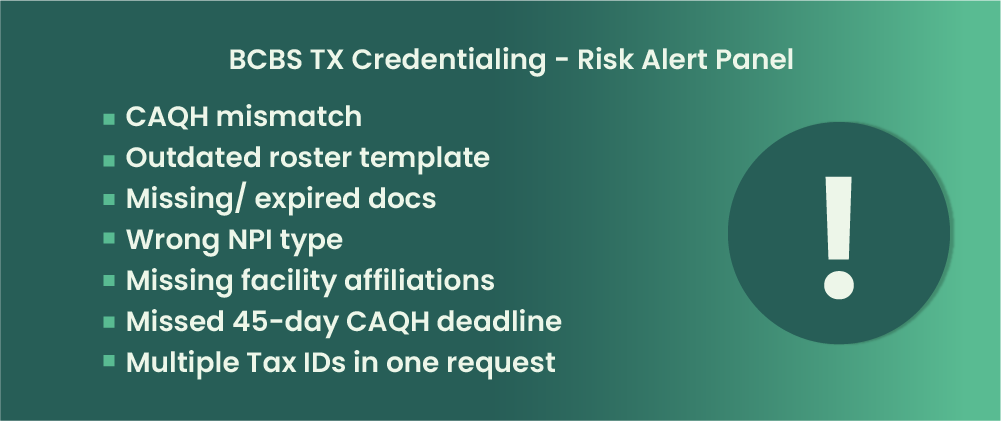
Why is my BCBS TX credentialing taking so long? Usually one of these seven issues:
-
CAQH profile not finalized within 45 days. BCBSTX can discontinue your application entirely. You'll have to restart from zero.
-
Outdated roster template. Anything older than version 25.11.22 gets rejected starting February 2026.
-
W-9 mismatch with Tax ID on application. Even a small discrepancy triggers manual review and back-and-forth emails.
-
Missing facility affiliations for facility-based providers. If you didn't list every hospital in the comments section, expect a return.
-
Incomplete CAQH sections. Leaving hospital affiliations blank because you're office-based doesn't work. BCBSTX wants every field complete.
-
License or DEA expiring during credentialing. If your credentials expire mid-process, everything stops until you renew and resubmit.
-
Not responding to payer requests within timeframe. BCBSTX gives you 10 business days. Miss it, and your turnaround time resets.
How to Expedite BCBS TX Credentialing
Speeding up BCBS Texas credentialing comes down to preparation and persistence. Here's what works:
-
Complete your CAQH profile fully before submitting the onboarding form
-
Triple-check that all data matches across every document: W-9, application, CAQH, NPI registry
-
Download and use the current roster template (version 25.11.22 or newer)
-
Follow up with BCBSTX every 2 to 3 weeks for status updates
-
Respond to any requests within 24 to 48 hours, not the full 10 days
-
Work with a credentialing specialist who knows BCBSTX requirements inside and out
The processing time difference between a clean application and a messy one can be 60 days or more.
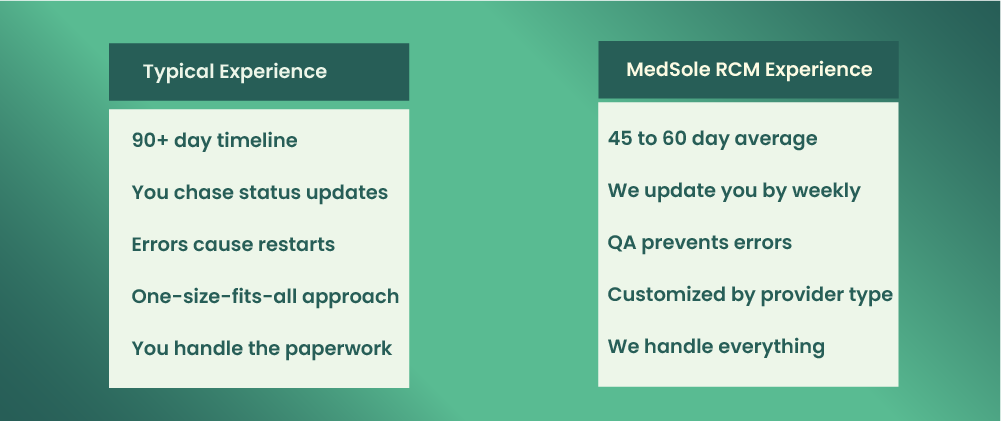
MedSole RCM Average Timeline: 45 to 60 Days
Our team's average BCBSTX enrollment timeline is 45 to 60 days, half the industry average. How? We QA every application before submission and follow up weekly until activation.
Why Wait 90+ Days When You Don't Have To?
MedSole RCM's BCBS TX enrollment service:
✓ 45 to 60 day average approval timeline
✓ $99 flat rate per payer
✓ biweekly status updates
✓ 99% first-time approval rate
✓ Dedicated enrollment manager
7 BCBS TX Provider Enrollment Mistakes That Cause Rejections (And How to Avoid Them)
After helping 1000+ Texas providers complete BCBSTX enrollment, we've identified the seven mistakes that cause the most rejections and application delays. Why was my BCBS TX application rejected? Usually one of these.
Mistake #1: CAQH and Application Data Mismatch
What happens: BCBSTX cross-references your CAQH ProView profile against your onboarding form. Any data discrepancy, even a suite number formatted differently or a phone number with dashes instead of dots, triggers manual review.
Why it matters: Manual review adds 2 to 4 weeks. Sometimes longer if the reviewer asks for clarification and you don't respond fast enough.
How to avoid it: Update CAQH first. Then copy every single data point exactly to your BCBS TX provider enrollment application. Same formatting, same abbreviations, same everything.
Real example: A Dallas internist had her address listed as "Ste 200" in CAQH and "Suite 200" on her application. Six weeks of back-and-forth before anyone caught it.
Mistake #2: Using Outdated Roster Templates
What happens: Group practices submit rosters on old templates. Starting February 2026, BCBSTX rejects anything older than version 25.11.22 automatically.
Why it matters: Your entire incomplete application gets returned. You'll need to re-enter all provider data on the new template and resubmit.
How to avoid it: Download a fresh template from the BCBSTX provider portal before every submission. Check the version number in the footer.
Real example: A Houston orthopedic group used their 2024 template for a January 2026 submission. Three weeks lost before they realized why nothing was moving.
Mistake #3: Missing or Expired Documents
What happens: Your state license or DEA expires during BCBSTX credentialing. Everything stops until you renew and resubmit proof.
Why it matters: Expiration during processing is one of the top rejection reasons. You can't backdate renewals, so you lose all progress.
How to avoid it: Check every expiration date before submitting. Anything expiring within 6 months of your submission date should be renewed first.
Real example: A San Antonio psychiatrist's DEA expired 45 days into credentialing. She had to restart the entire process after renewal.
Mistake #4: Wrong NPI Type (Individual vs. Group)
What happens: Providers confuse NPI Type 1 (individual) with NPI Type 2 (organization). Listing the wrong one creates a mismatch that BCBSTX can't process.
Why it matters: NPI errors cause outright denial, not just delays. How do I fix errors on my BCBS TX application when this happens? You resubmit entirely.
How to avoid it: Verify your NPI type on the NPPES registry before completing any enrollment paperwork. Solo providers use Type 1. Groups use Type 2 for the practice, plus Type 1 for each individual.
Mistake #5: Not Listing Facility Affiliations
What happens: Hospital-based providers forget to list every facility they service. BCBSTX requires this information in the comments section or roster column.
Why it matters: Missing facility affiliations means your application comes back. You'll need to add the information and wait for re-review.
How to avoid it: Before submitting, list every hospital, ASC, or facility where you provide services. Don't assume BCBSTX knows your affiliations.
Mistake #6: Missing the 45-Day CAQH Deadline
What happens: BCBSTX starts your credentialing, but your CAQH ProView profile isn't finalized within 45 days. They discontinue your application entirely.
Why it matters: This isn't a pause. It's a full restart. Every day you spent waiting disappears, and you begin from zero.
How to avoid it: Complete your CAQH profile before you submit the BCBSTX onboarding form. Attest it, authorize access, and confirm everything is marked complete.
Mistake #7: Submitting Multiple Tax IDs in One Request
What happens: Practices with multiple Tax IDs try to submit everything in a single onboarding request. BCBSTX requires one Tax ID per request, no exceptions.
Why it matters: Your submission gets separated or rejected. Either way, you're looking at weeks of additional processing time.
How to avoid it: Submit a separate Provider Record ID request for each Tax ID. Treat them as completely independent applications.
These seven mistakes account for most of the missing documents issues and rejection reasons we see. Avoiding them won't guarantee instant approval, but it eliminates the most common causes of BCBSTX credentialing delays.
Avoid These Mistakes Automatically
MedSole RCM's credentialing specialists QA every BCBSTX application before submission. We catch errors before BCBSTX does, so you don't lose weeks to rework.
[Schedule Free Consultation →]
How to Check Your BCBS TX Provider Enrollment Status
How do I check my BCBS TX credentialing status? You have two options: the online portal or the phone. Neither is fast, but knowing where to look saves time.
Using the BCBSTX Provider Portal
The BCBSTX Provider Portal is accessible through Availity or directly at BCBSTX.com/provider. You'll need your BCBSTX provider login credentials to access credentialing information.
Once logged in, navigate to the credentialing or enrollment section. Look for your application pending status under your Tax ID. The system shows different status indicators:
-
Received: They have your application but haven't started review
-
In Review: Primary source verification is underway
-
Pending Information: They need something from you; check your messages
-
Approved: Credentialing complete; contract stage next
-
Active: You're in-network and can bill
How do I know if my BCBS TX application is approved? The status will change from "In Review" to "Approved." You'll also receive a notification through the portal or email.
Contacting BCBSTX Credentialing by Phone
Sometimes the portal doesn't show updated information. Here's where to call for BCBSTX credentialing status directly:
📞 BCBSTX Provider Services: 1-800-749-0966
📞 Credentialing Department: 1-800-749-0966 (select credentialing option)
⏰ Hours: Monday through Friday, 8am to 5pm CT
When calling, have your Tax ID, NPI, and Provider Record ID ready. The representative will ask for all three before pulling up your case. Without them, you'll spend extra time on hold while they search.
What to Do If Your Application is Stuck
Application pending for more than 90 days with no movement? Here's the sequence that works:
-
Check CAQH first. Log into CAQH ProView and verify your profile is complete and attested. Unfinished CAQH is the most common invisible blocker.
-
Look for outstanding requests. Check your portal messages and email spam folder. BCBSTX may have asked for something you never saw.
-
Call credentialing directly. Ask for your case status and whether anything is pending on your end.
-
Request a supervisor. If you've called twice with no resolution, ask to escalate. Note the name and reference number.
-
Consider a credentialing specialist. If you're past 120 days, something structural is wrong with your application.
What happens after BCBS TX credentialing is complete? You'll receive a provider agreement to sign. Once signed and processed, BCBSTX assigns your effective date and sends enrollment confirmation. Only then can you bill as in-network.
Tired of sitting on hold? MedSole RCM clients get biweekly status updates directly, no phone tag required. [Learn more →]
Which BCBS TX Networks Can You Join?
BCBSTX offers several network options for insurance paneling, each with different member bases and fee schedules. During the onboarding process, you'll indicate which networks you want to join. Most providers apply to multiple networks to maximize patient access and BCBS TX network participation.
Here's a quick overview:
|
Network |
Overview |
Best For |
|
BlueChoice PPO |
Largest commercial network |
Most providers (primary choice) |
|
Blue Essentials |
Narrower, employer-focused network |
Practices seeking higher patient volume |
|
ParPlan |
Traditional indemnity-style network |
Practices with a well-defined patient mix |
|
Blue Premier |
Premium tier with higher reimbursement |
Established, high-performing practices |
|
Medicare Advantage |
Separate Medicare-based track |
Providers already enrolled in Medicare |
Can I enroll in multiple BCBS TX networks? Yes. Each network may have its own credentialing requirements and fee schedules, but you can apply to several at once. You'll select your preferred networks on the Provider Onboarding Form during submission.
Before choosing, look at your current patient demographics. If most of your Blue Cross patients carry BlueChoice PPO, start there. Adding Blue Essentials or Blue Premier depends on your growth strategy and whether the fee schedules work for your practice.
Not sure which networks fit your practice? Our team can analyze your patient mix and recommend the right strategy. [Get Free Analysis →]
BCBS TX Medicaid Provider Enrollment: STAR, CHIP & STAR Kids
Enrolling with BCBSTX for Texas Medicaid managed care follows a different path than commercial enrollment. If you want to serve Texas STAR, CHIP, or STAR Kids patients through Blue Cross, you can't just submit the standard onboarding form. Here's what you need to know about BCBS TX Medicaid provider enrollment.
How Medicaid Enrollment Differs from Commercial
The key difference: providers must first enroll and attest with Texas Medicaid through TMHP/PEMS before initiating credentialing with BCBSTX for Medicaid products.
Think of it as a two-step process. You can't skip the Texas Medicaid enrollment and go straight to BCBSTX. They'll reject your application if you try.
|
Commercial (BCBSTX) |
Medicaid (Texas) |
|
Apply directly to BCBSTX |
Enroll with TMHP / PEMS first |
|
CAQH is the primary data source |
PEMS + CAQH used together |
|
One-step contracting process |
Dual enrollment required before contracting |
For BCBS TX STAR provider enrollment or BCBS TX CHIP provider enrollment, you're essentially doing two separate enrollments that must align.
Step-by-Step Medicaid Enrollment Process
Here's the sequence for joining BCBSTX Medicaid networks:
-
Enroll with Texas Medicaid via TMHP/PEMS. Create your account and submit your initial application through the PEMS portal.
-
Complete the PEMS credentialing tab. This is a new 2025 feature that lets you enter credentialing information directly inside PEMS.
-
Attest with Texas Medicaid. Sign the provider agreement and complete attestation requirements.
-
Initiate credentialing with BCBSTX for Medicaid products. Now you can approach BCBSTX specifically for their managed care networks.
-
Complete BCBSTX Medicaid-specific requirements. Submit any additional forms BCBSTX requires for STAR, CHIP, or STAR Kids participation.
-
Contract and activate. Sign the BCBSTX Medicaid provider agreement and receive your effective date.
The entire dual-enrollment process typically takes longer than commercial credentialing. Plan accordingly.
2025/2026 PEMS Updates You Need to Know
As of May 30, 2025, PEMS was enhanced to allow providers to complete credentialing information directly inside PEMS during enrollment, re-enrollment, or via maintenance request. This streamlines the dual-enrollment process significantly.
Before this update, you had to manage credentialing separately through CAQH and then coordinate with Texas Medicaid manually. The new PEMS credentialing tab reduces duplicate data entry and speeds up the verification process.
If you're starting fresh with Texas Medicaid enrollment, you'll benefit from this change immediately. Existing providers can update their information through a PEMS maintenance request.
Need help with both commercial AND Medicaid enrollment? MedSole RCM handles multi-payer enrollment for Texas practices. [Learn more →]
BCBS TX Provider Enrollment Contact Information & Phone Numbers
Here's every BCBS TX provider enrollment phone number and contact method you'll need. Save this page. You'll reference it constantly during enrollment.
|
Department |
Phone / Contact |
Hours |
|
Provider Services |
1-800-749-0966 |
Monday–Friday, 8 am–5 pm CT |
|
Credentialing |
1-800-749-0966 (select Option 2) |
Monday–Friday, 8 am–5 pm CT |
|
Claims |
1-800-749-7533 |
Monday–Friday, 8 am–5 pm CT |
|
Ancillary Contracting |
AncillaryContracting@bcbstx.com (email) |
Email response within 48 hours |
The BCBSTX credentialing phone number routes through the main provider services line. Listen carefully to the menu options. They change periodically, and pressing the wrong number sends you to the wrong department.
Online Resources:
-
BCBSTX Provider Portal: bcbstx.com/provider
-
Availity Login: availity.com
-
Provider Onboarding Form: Download from BCBSTX provider portal under "Network Participation"
-
Roster Template Download: Located in provider portal under "Forms & Documents"
Pro tip: Before calling, have your Tax ID, NPI, and Provider Record ID written down. The representative asks for all three within the first 30 seconds. Having them ready cuts your call time in half. Missing even one means they'll put you on hold while they search manually.
When you reach the BCBS TX provider services phone number, write down the representative's name and reference number. You'll need both if you have to call back about the same issue.
📞 Skip the Hold Time
MedSole RCM clients never wait on hold with BCBSTX. We handle all communication and provide weekly status updates directly to you.
FAQ: BCBS TX Provider Enrollment Questions Answered
If you have questions about the process, you aren't alone. These are the answers I find myself repeating almost daily to new clients.
How do I enroll as a BCBS Texas provider?
To enroll as a BCBS Texas provider, you must: (1) Confirm you have a valid Texas license and physical address, (2) Complete your CAQH ProView profile, (3) Submit the BCBSTX Provider Onboarding Form along with a signed W-9 and license copy, (4) Pass credentialing verification, and (5) Sign the provider agreement. The full process typically takes 60 to 90 days.
What is BCBS TX provider enrollment?
BCBS TX provider enrollment is the formal process used by healthcare providers to apply for participation in Blue Cross Blue Shield of Texas networks. It involves submitting an onboarding application, verifying credentials through CAQH, and signing a contract. Once fully enrolled, providers can bill BCBSTX as in-network.
What is a provider record ID?
A BCBSTX Provider Record ID is a unique number assigned to each Tax ID (TIN) that bills BCBSTX. It is required for network participation and electronic claims submission. Important note: A Provider Record ID does NOT automatically make you in-network. Claims will process as out-of-network until credentialing and contracting are finalized.
How long does BCBS TX credentialing take?
BCBS TX credentialing typically takes 60 to 90 days for physicians and professional providers. Ancillary providers may experience timelines up to 90 days. Applications containing errors or CAQH discrepancies can extend this to 120 days or more. Working with a credentialing specialist can often reduce this to 45 to 60 days.
Why is my BCBS TX credentialing taking so long?
Common causes for delay include: (1) CAQH data not matching the application, (2) Submitting outdated roster templates (must be version 25.11.22+ as of Feb 2026), (3) Missing or expired documents, (4) Failure to respond to payer requests promptly, and (5) Missing the 45-day CAQH completion deadline.
When can I start billing BCBS Texas?
You can bill BCBS Texas as in-network only after receiving your effective date following contract signing. Until that specific date, all claims process as out-of-network. The effective date is typically the day your contract is signed, though providers can sometimes negotiate earlier dates.
What documents are needed for BCBS TX enrollment?
Required documents include: (1) Valid Texas license, (2) Provider Onboarding Form, (3) Signed W-9, (4) License copy, (5) DEA registration (if applicable), (6) Malpractice insurance certificate, (7) Board certifications, (8) Active CAQH profile, (9) NPI, and (10) For groups: a roster on template 25.11.22 or newer.
Do I need CAQH for BCBS Texas enrollment?
Yes, most providers need an active CAQH ProView profile. BCBSTX uses CAQH for primary source verification. Important: If you do not finalize CAQH within 45 days, BCBSTX can discontinue your credentialing, requiring you to restart. Some ancillary providers may use alternative forms.
How do I check my BCBS TX credentialing status?
You can check your status by: (1) Logging into the BCBSTX Provider Portal or Availity, (2) Navigating to the credentialing section, and (3) Locating your application via Tax ID or NPI. You can also call BCBSTX Provider Services, ensuring you have your Tax ID and Provider Record ID ready.
What happens after BCBS TX credentialing is complete?
After credentialing is approved, you will receive a provider agreement to sign. Once signed, you will get an effective date and your provider record will activate for in-network claims processing. At this point, you will appear in the BCBSTX provider directory.
Can I bill BCBS TX without being credentialed?
You can submit claims before credentialing is complete, but they will process as out-of-network. This results in lower reimbursement for you and higher cost-sharing for the patient. A Provider Record ID alone does not grant in-network status; full credentialing and contracting are required.
Why was my BCBS TX application rejected?
Common rejection reasons include: (1) Data mismatches between CAQH and the application, (2) Using an outdated roster template, (3) Missing required forms (especially the Behavioral Health Form), (4) Incorrect NPI type, (5) Missing facility affiliations, and (6) An expired license or DEA during processing.
How do I fix errors on my BCBS TX application?
To fix errors: (1) Contact BCBSTX credentialing to identify the specific issue, (2) Update your CAQH profile if that is the source, (3) Submit corrected documents as requested, and (4) Resubmit the onboarding form if required. Respond within 24 to 48 hours to prevent further delays.
How do I expedite BCBS TX credentialing?
To expedite the process: (1) Complete CAQH before submitting the onboarding form, (2) Triple-check that all data matches across documents, (3) Use the current roster template (25.11.22+), (4) Include all required forms upfront, (5) Follow up every 2 to 3 weeks, and (6) Respond to requests within 24 hours.
How often do I need to recredential with BCBS TX?
BCBS TX requires recredentialing every 2 to 3 years. You will receive a notification before your deadline. Additionally, BCBSTX may cancel your Provider Record ID if claims are not filed within 24 months, requiring a new onboarding application to reinstate.
Why Texas Providers Choose MedSole RCM for BCBS TX Enrollment
BCBSTX enrollment delays cost you money every day you can't bill in-network. At MedSole RCM, we've streamlined the enrollment process so you can start seeing patients and getting paid in 45 to 60 days, not 90 or more.
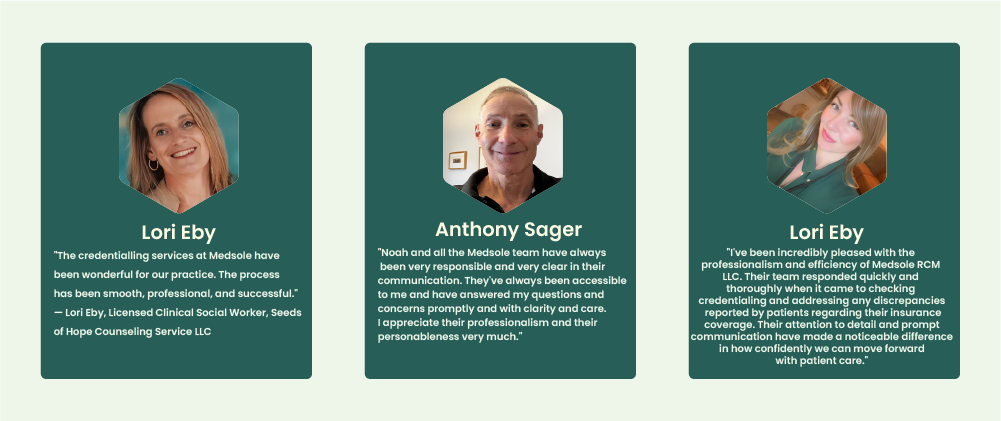
What our Clients Say
Our BCBS TX Enrollment Process
We handle credentialing and enrollment services differently than most. Here's our process:
Step 1: Free Assessment
We review your current credentialing status, identify gaps, and create a customized enrollment plan for your practice type.
Step 2: Document Collection & QA
We gather all required documents, verify they match across systems, and ensure roster templates are current. No surprises later.
Step 3: Application Submission
We submit your BCBSTX onboarding form with all supporting documents, eliminating the common errors that cause delays.
Step 4: Weekly Tracking & Follow-Up
We contact BCBSTX weekly, respond to requests immediately, and provide you with regular status updates. You'll always know where things stand.
Step 5: Contract to Activation
We guide you through contract signing and confirm network activation, so you can bill from day one.
What Makes Us Different
Our medical billing credentialing team knows BCBSTX's specific requirements. That's why we catch issues before submission, not after rejection.
Our Pricing: $99 Per Payer, No Hidden Fees
BCBS TX Provider Enrollment: $99
What's included:
-
CAQH setup and management
-
Document collection and verification
-
Onboarding form submission
-
Weekly status tracking
-
All follow-up communication
-
Contract coordination
-
Activation confirmation
No hidden fees. No surprise charges. One flat rate for healthcare credentialing Texas providers can count on.